Grammarly-style writing help. Your key, your provider, your text.
ProofKey is a free, open-source Chrome extension. It underlines mistakes as you type and rewrites on request, the way Grammarly does. The difference is where the text goes: only to the AI provider you configure with your own API key, or to a model running on your own machine. In Google Chrome it needs neither: it starts on the model Chrome keeps on your computer, with no key and no account. There is no server of ours in between.
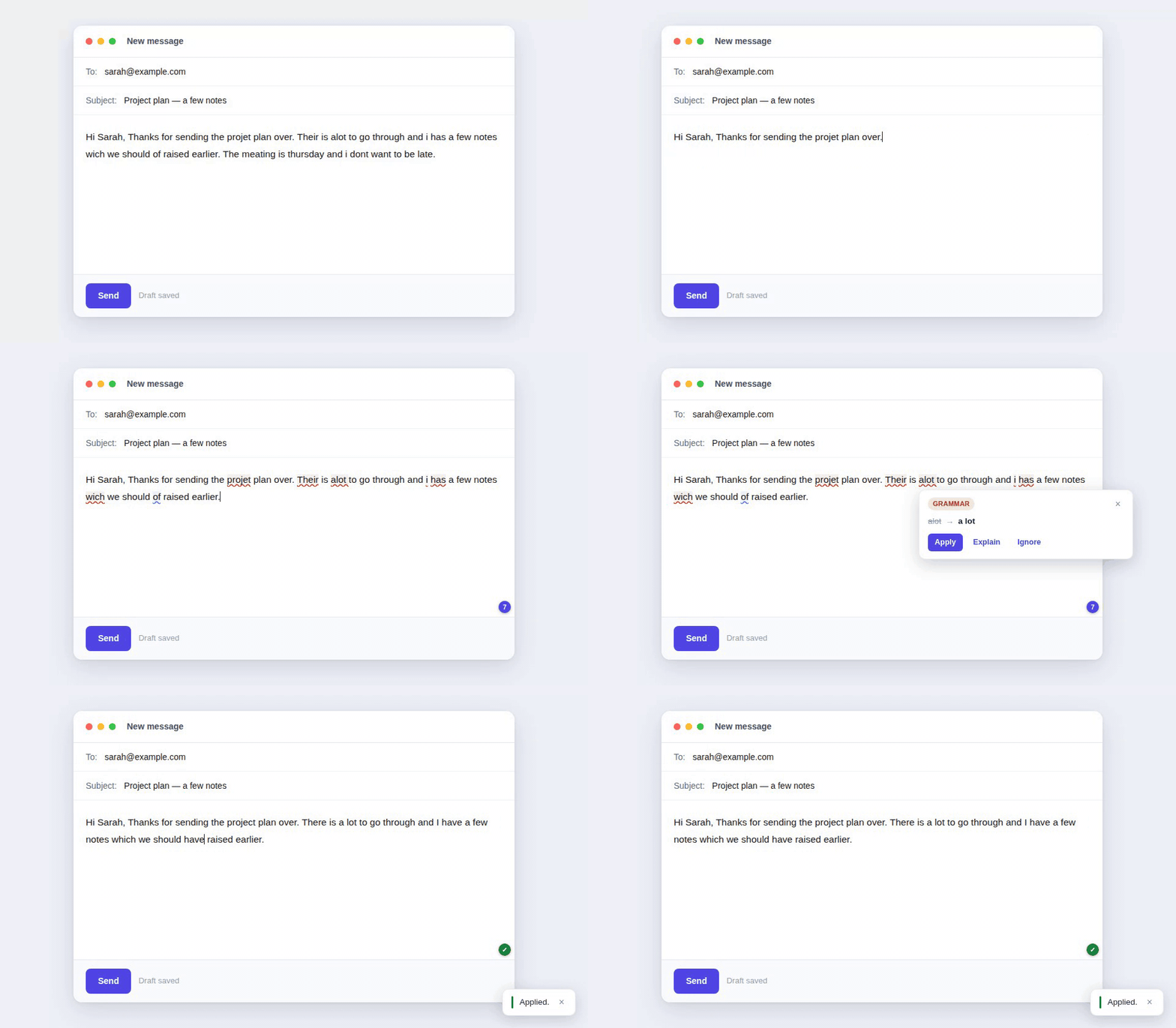
Recorded against the shipped code with canned corrections, so no key was involved. On a real site the suggestions come from the model you chose.
What it does
- Underlines grammar, spelling and style issues as you type, with a badge counting them.
- A card on each underline: apply the fix, ask the model to explain it, ignore it, or add the word to your dictionary.
- Nine actions on selected text, from the right-click menu or a keyboard shortcut: fix grammar, improve writing, make professional, make friendly, simplify, summarize, expand, convert to bullet points, translate.
- A writing profile the model sees on every request: your style guide, words it must never flag, your first language, the language you want explanations in.
- A fallback chain: a local model first and a cloud key second, or the other way round. When one fails, ProofKey moves down the list and tells you which one failed.
Where it works today
Everything on this list was run by hand, in a real browser, on a published build. Everything else is untested, which means nobody has checked, not that it is broken.
WhatsApp Web, Gmail, Telegram Web, Outlook and Hotmail, Tuta, Reddit, X.
iCloud Mail and Infomaniak Mail work after one extra origin is allowed, because their editor lives inside a frame on another domain. ProofKey offers that origin when the cursor lands there.
Google Docs is not supported: it paints text to a canvas and there is nothing to underline.
No key: Chrome's built-in model (Gemini Nano), for live checking and Fix grammar, measured in Google Chrome 153 on one laptop. Brave reports it unavailable; other browsers are untested.
Measured with real keys: Google Gemini, xAI (Grok), OpenRouter, OpenCode Go. Measured self-hosted: a local llama.cpp server, three models end to end.
The other 31 presets, Anthropic, OpenAI, Mistral, Groq, Ollama and the rest, take the same code path as something that was tested, but nobody has run them yet.
Getting started
In Google Chrome there is nothing to sign up for. Settings opens after you install, with Chrome's built-in model already selected.
- On the Chrome built-in AI card, click Download model. Chrome fetches it once, about 4 GB.
- When the card says Ready, open any site with a text box, allow ProofKey on it from the toolbar button, and type a sentence with mistakes.
That model is smaller than the cloud ones, so ProofKey offers it live checking and Fix grammar, the two it measured well on, and keeps the other actions for a provider with a key. For every action, or in a browser without the model, add an API key: about two minutes with a free Gemini key from Google AI Studio, and for ordinary use the free allowance is usually enough.
- Open Google AI Studio, sign in with any Google account, and click Create API key.
- In Chrome, click the ProofKey icon, then Settings, and choose Google Gemini from the provider list.
- Paste the key, click Fetch models, pick gemini-2.5-flash, and save.
- Open any site with a text box, allow ProofKey on it from the toolbar button, and type a sentence with mistakes.
On a free key the provider may use what you send to improve its models. Check the terms of the provider you pick before pasting anything sensitive.
When a daily cap is hit, live checking goes quiet instead of showing an error. The actions still tell you what went wrong.
Privacy, plainly
- ProofKey has no backend. Your text goes from your browser directly to the endpoint you configured, and nowhere else. Point it at a local model and nothing leaves your machine.
- With Chrome's built-in model, ProofKey makes no request at all: the check runs on your computer.
- No account, no sign-up, no telemetry, no analytics. Your key is stored in your browser's extension storage and is never sent anywhere but to your provider.
- Site access is requested per site, by you. Not up front, and not for all sites.
- With any other provider, your text is subject to its privacy policy. Providers vary enormously on retention and training, and that is worth reading first.
Honest status
This is an early release. What is built is larger than what has been confirmed by hand, and the repository keeps the two apart: an automated test asserts this, a maintainer ran it, a user reported it, or nobody has tried. A row only moves when there is a link to point at.
If it breaks for you, an issue is far more useful than a comment: GitHub Issues
MIT licence. Built by Jiru Labs in Madrid.